# Authentication
Organization API uses OAuth authentication protocol in order to grant access and authenticate client requests. Your launch engineer has to provide you with an OAuth client identifier (`clientId`) and secret (`clientSecret`) at your request.
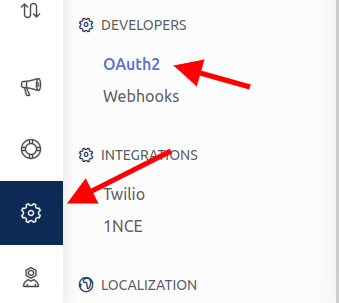
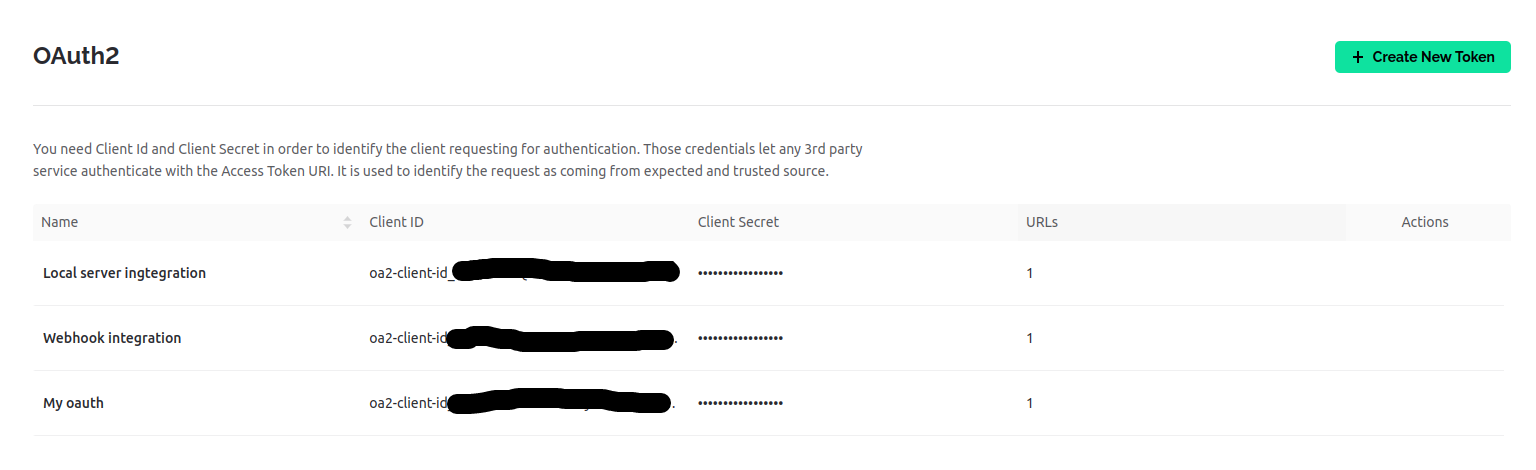
Alternatively, you can find it in **Settings** -> **Developers** -> **OAuth2**:
OAuth2 Develoepr section
OAuth2 Tokens list
## Authenticate using Authorization Header
To obtain authentication tokens use `client_credentials` grant type as mentioned below:
## Authenticate using client credentials
`POST` `https://{server_address}/oauth2/token`
Authentication to Organization API using oAuth client credentials provided in `Authorization` header.
#### Query Parameters
| Name | Type | Description |
| --------------------------------------------- | ---- | ----------------------- |
| grant\_type\* | | Use client\_credentials |
#### Headers
| Name | Type | Description |
| ----------------------------------------------- | ---- | ---------------------------------------------------------------------------------------------------------------------------------------------- |
| Authorization\* | |
Provide authorization header with oAuth client credentials filled in basic authorization format:
Basic {credentials}
|
{% tabs %}
{% tab title="200: OK Successfuly authenticated" %}
Example response:
```json
{
"access_token":"ct6Q2h1OiDHJaePbBgrpCgN3xfLPc9WYnCC6tRFd",
"token_type":"Bearer",
"expires_in":300,
"refresh_token":"fx8TlqzAxg5b8Ukzp46rD-FXpxrNxHKX3BZQjGhG"
}
```
Use `access_token` value to authenticate further requests and `refresh_token` to refresh the token after its expiration. Use `expires_in` (value specified in seconds) parameter to determine token expiration time.
{% endtab %}
{% tab title="400: Bad Request Authentication failed" %}
Example response:
```json
{
"error": "invalid_client",
"error_description": "Client ID is not found or password is wrong."
}
```
`error` parameter is one of: `invalid_request`, `invalid_client`, `invalid_grant`, `unauthorized_client`, `unsupported_grant_type`.
{% endtab %}
{% endtabs %}
#### Usage example
cURL:
```
$ curl -X POST -u {clientId}:{clientSecret} https://{server_address}/oauth2/token?grant_type=client_credentials
```
cURL with real data:
```
$ curl -X POST -u oa2-client-id_zmNtW-D0Toqpz4AZnBLCIlklBrz9ynU-:5uC5Y4Mcvdl5rB56rBmxnvB4DZgiIpcyTPbOoEWp https://fra1.blynk.cloud/oauth2/token?grant_type=client_credentials
```
## Token Refresh using Authorization Header
After authentication token expiration use `refresh_token` grant type to refresh it:
## Refresh authentication token
`POST` `https://{server_address}/oauth2/token`
Refreshing the authentication to Organization API using oAuth client credentials provided in `Authorization` header and refresh token issued in previous authentication response.
#### Query Parameters
| Name | Type | Description |
| ------------------------------------------------ | ---- | -------------------------------------------------------- |
| refresh\_token\* | | Refresh token, issued by previous authentication request |
| grant\_type\* | | refresh\_token |
#### Headers
| Name | Type | Description |
| ----------------------------------------------- | ---- | ---------------------------------------------------------------------------------------------------------------------------------------------- |
| Authorization\* | |
Provide authorization header with oAuth client credentials filled in basic authorization format:
Basic {credentials}
|
{% tabs %}
{% tab title="200: OK Successfuly authenticated" %}
Example response:
```json
{
"access_token":"ct6Q2h1OiDHJaePbBgrpCgN3xfLPc9WYnCC6tRFd",
"token_type":"Bearer",
"expires_in":300,
"refresh_token":"fx8TlqzAxg5b8Ukzp46rD-FXpxrNxHKX3BZQjGhG"
}
```
Use `access_token` value to authenticate further requests and `refresh_token` to refresh the token after it's expiration. Use `expires_in` (value specified in seconds) parameter to determine token expiration time.
{% endtab %}
{% tab title="400: Bad Request Authentication failed" %}
Example response:
```json
{
"error": "invalid_client",
"error_description": "Client ID is not found or password is wrong."
}
```
`error` parameter is one of: `invalid_request`, `invalid_client`, `invalid_grant`, `unauthorized_client`, `unsupported_grant_type`.
{% endtab %}
{% endtabs %}
#### Usage example
cURL:
```
$ curl -X POST -u {clientId}:{clientSecret} https://{server_address}/oauth2/token?grant_type=refresh_token&refresh_token={refreshToken}
```
cURL with real data:
```
$ curl -X POST -u oa2-client-id_zmNtW-D0Toqpz4AZnBLCIlklBrz9ynU-:5uC5Y4Mcvdl5rB56rBmxnvB4DZgiIpcyTPbOoEWp https://fra1.blynk.cloud/oauth2/token?grant_type=refresh_token&refresh_token=Esiu5g_OVc0ZxoH_F3X-4-lIoMvcU3yJjBN4QoQq
```
## Authenticate using query parameters
Authentication using query parameters is less preferred due to it's lower security, but more easier. You may use this authentication type to achieve quick results as it can even be tested in a browser.
## Authenticate using client credentials
`POST` `https://{server_address}/oauth2/token`
Authentication to Organization API using oAuth client credentials provided in query parameters.
#### Query Parameters
| Name | Type | Description |
| ------------------------------------------------ | ------ | ----------------------- |
| grant\_type\* | | client\_credentials |
| client\_id\* | String | oAuth client identifier |
| client\_secret\* | String | oAuth client secret |
{% tabs %}
{% tab title="200: OK Successfuly authenticated" %}
Example response:
```json
{
"access_token":"ct6Q2h1OiDHJaePbBgrpCgN3xfLPc9WYnCC6tRFd",
"token_type":"Bearer",
"expires_in":300,
"refresh_token":"fx8TlqzAxg5b8Ukzp46rD-FXpxrNxHKX3BZQjGhG"
}
```
Use `access_token` value to authenticate further requests and `refresh_token` to refresh the token after it's expiration. Use `expires_in` (value specified in seconds) parameter to determine token expiration time.
{% endtab %}
{% tab title="400: Bad Request Authentication failed" %}
Example response:
```json
{
"error": "invalid_client",
"error_description": "Client ID is not found or password is wrong."
}
```
`error` parameter is one of: `invalid_request`, `invalid_client`, `invalid_grant`, `unauthorized_client`, `unsupported_grant_type`.
{% endtab %}
{% endtabs %}
#### Usage example
cURL:
```
$ curl -X POST https://{server_addresss}/oauth2/token?grant_type=client_credentials&client_id={clientId}&client_secret={clientSecret}
```
cURL with real data:
```
$ curl -X POST https://fra1.blynk.cloud/oauth2/token?grant_type=client_credentials&client_id=oa2-client-id_zmNtW-D0Toqpz4AZnBLCIlklBrz9ynU-&client_secret=5uC5Y4Mcvdl5rB56rBmxnvB4DZgiIpcyTPbOoEWp
```
## Token Refresh using query parameters
## Refresh authentication token
`POST` `https://{server_address}/oauth2/token`
Refreshing the authentication to Organization API using query parameters with oAuth client credentials and refresh token issued in previous authentication response.
#### Query Parameters
| Name | Type | Description |
| ------------------------------------------------ | ------ | -------------------------------------------------------- |
| grant\_type\* | | refresh\_token |
| refresh\_token\* | String | Refresh token, issued by previous authentication request |
| client\_id\* | String | oAuth client identifier |
| client\_secret\* | String | oAuth client secret |
{% tabs %}
{% tab title="200: OK Successfuly authenticated" %}
Example response:
```json
{
"access_token":"ct6Q2h1OiDHJaePbBgrpCgN3xfLPc9WYnCC6tRFd",
"token_type":"Bearer",
"expires_in":300,
"refresh_token":"fx8TlqzAxg5b8Ukzp46rD-FXpxrNxHKX3BZQjGhG"
}
```
Use `access_token` value to authenticate further requests and `refresh_token` to refresh the token after it's expiration. Use `expires_in` (value specified in seconds) parameter to determine token expiration time.
{% endtab %}
{% tab title="400: Bad Request Authentication failed" %}
Example response:
```json
{
"error": "invalid_client",
"error_description": "Client ID is not found or password is wrong."
}
```
`error` parameter is one of: `invalid_request`, `invalid_client`, `invalid_grant`, `unauthorized_client`, `unsupported_grant_type`.
{% endtab %}
{% endtabs %}
#### Usage example
cURL:
```
$ curl -X POST https://{server_address}/oauth2/token?grant_type=refresh_token&refresh_token={refreshToken}&client_id={clientId}&client_secret={clientSecret}
```
cURL with real data:
```
$ curl -X POST https://fra1.blynk.cloud/oauth2/token?grant_type=refresh_token&refresh_token=pLa8jdJWHuCUfVniqNc8XimUs0gUZ8YuK_qsaUej&client_id=oa2-client-id_zmNtW-D0Toqpz4AZnBLCIlklBrz9ynU-&client_secret=5uC5Y4Mcvdl5rB56rBmxnvB4DZgiIpcyTPbOoEWp
```