> For the complete documentation index, see [llms.txt](https://docs.blynk.io/en/llms.txt). Markdown versions of documentation pages are available by appending `.md` to page URLs; this page is available as [Markdown](https://docs.blynk.io/en/blynk.console/templates/data-converters/mqtt-data-converter.md).
# MQTT Data Converter
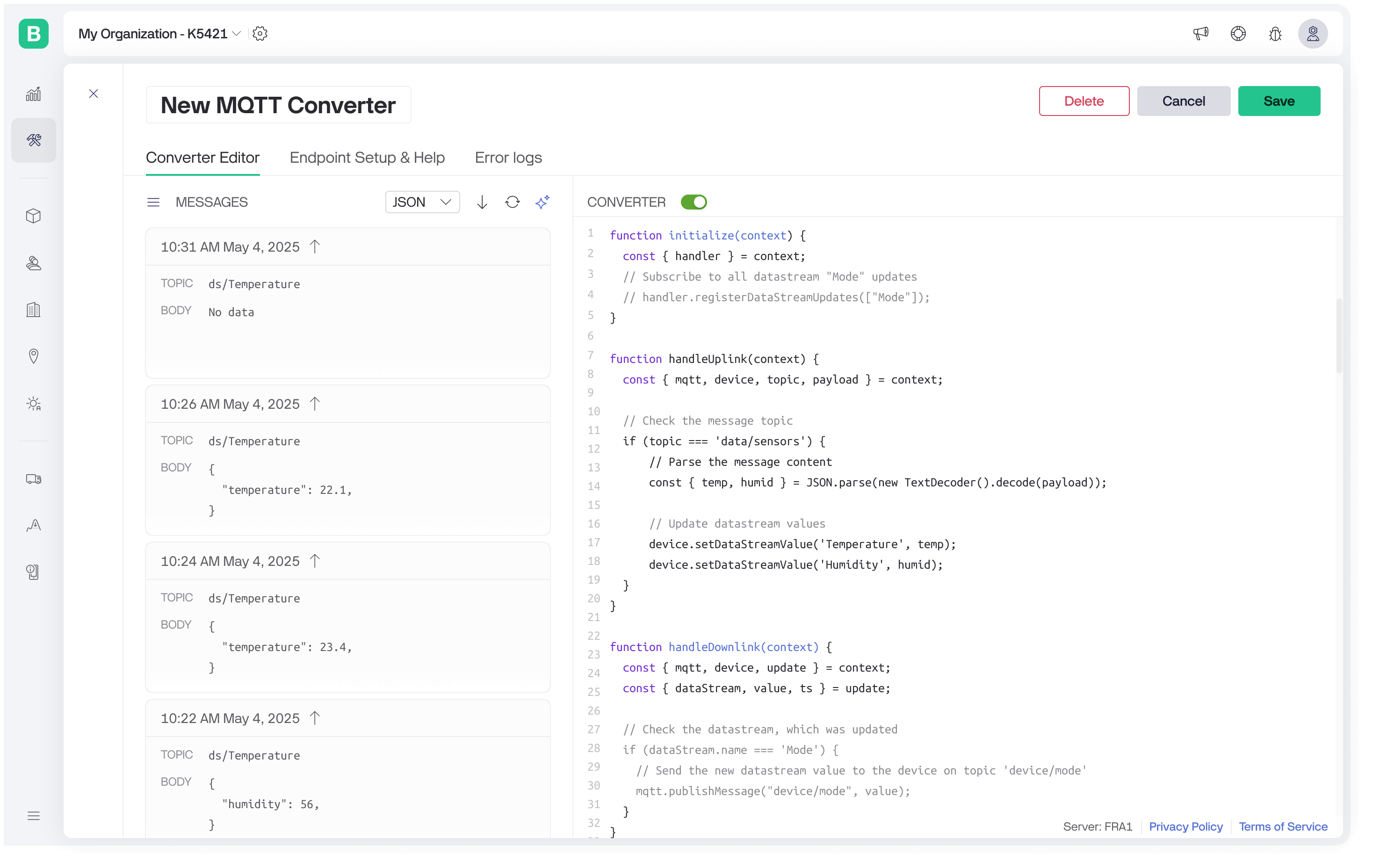
MQTT Data Converter lets you handle messages on any topic with a custom payload. Devices must connect using `"device"` as the username and their Blynk Auth Token as the password. A user-defined script can parse incoming messages, update datastreams, log events, access existing values, or publish messages back to the device. For downlink, the script subscribes to specific datastream updates, and whenever a value changes, Blynk executes the converter to send the new value to the device.
## Examples
**Handle uplink MQTT message and update datastream value**
```javascript
function handleUplink(context) {
const { mqtt, device, topic, payload } = context;
// Check the message topic
if (topic === 'data/sensors') {
// Parse the message content
const { temp, humid } = JSON.parse(new TextDecoder().decode(payload));
// Update datastream values
device.setDataStreamValue('Temperature', temp);
device.setDataStreamValue('Humidity', humid);
}
}
```
**Handle datastream update and send MQTT message to the device**
```javascript
function initialize(context) {
const { handler } = context;
// Subscribe to all datastream "Mode" updates
handler.registerDataStreamUpdates(["Mode"]);
}
function handleDownlink(context) {
const { mqtt, device, update } = context;
const { dataStream, value, ts } = update;
// Check the datastream, which was updated
if (dataStream.name === 'Mode') {
// Send the new datastream value to the device on topic 'device/mode'
mqtt.publishMessage("device/mode", String(value));
}
}
```
## TypeScript declaration
```typescript
/**
* Represents the allowed value types for a datastream.
* - number: for integer, double and enum datastreams
* - string: for string datastreams
* - { lon: number, lat: number }: for location datastreams
*/
type DataStreamValue = number | string | { lon: number; lat: number };
interface DataStream {
value: DataStreamValue | null; // Current device datastream value
lastUpdatedAt: number | null; // Unix timestamp (ms) when the value was last updated, null if no value exists
}
/**
* DataStream property names.
*/
type DataStreamPropertyName = 'label' | 'color' | 'onBackColor' | 'offBackColor' |
'onColor' | 'offColor' | 'onLabel' | 'offLabel' | 'labels' |
'min' | 'max' | 'isOnPlay' | 'url' | 'urls' | 'step' | 'valueFormatting' |
'suffix' | 'maximumFractionDigits' | 'opacity' | 'scale' | 'rotation' |
'sortType' | 'isDisabled' | 'isHidden' | 'icons' | 'onImageUrl' | 'offImageUrl' |
'page' | 'sound' | 'isMuted' | 'loop' | 'autoplay' | 'contentDesign' | 'backColor';
/**
* DataStream property names that accept boolean values.
*/
type DataStreamBooleanPropertyName = 'isOnPlay' | 'isDisabled' | 'isHidden' | 'isMuted' | 'loop' | 'autoplay';
/**
* Represents a Blynk device.
*/
interface Device {
/**
* Gets the current value of a datastream.
* @param dataStreamName Datastream name (required)
* @returns the datastream value or `null`, if the datastream is missing or the value was not configured
* @throws Error if datastream name is not provided or contains more than 1000 symbolstoo long
*/
getDataStreamValue(dataStreamName: string): DataStreamValue | null;
/**
* Gets the device datastream info.
* @param dataStreamName Datastream name (required)
* @returns the datastream value or `null`, if the datastream is missing
* @throws Error if datastream name is not provided or contains more than 1000 symbols
*/
getDataStreamValue(dataStreamName: string): DataStream | null;
/**
* Updates the value of a device datastream.
* Note: For string values, the maximum length is 1024 characters.
*
* @param dataStreamName Datastream name
* @param value New value for the datastream
* @throws Error if the datastream name is not provided, empty, or contains more than 1000 symbols
* @throws Error if datastream value is invalid
* @throws Error if 256 datastreams were already updated
*/
setDataStreamValue(dataStreamName: string, value: DataStreamValue): void;
/**
* Updates the datastream property value.
* Note: You can provide up to 100 values. Each value should be up to 1000 characters in length.
*
* @param dataStreamName Datastream name
* @param propertyName Property name to update
* @param values New property values
* @throws Error if the datastream name is not provided, empty, or contains more than 1000 symbols
* @throws Error if the datastream property name is not provided, empty, contains more than 1000 symbols or unknown
* @throws Error if property value is invalid or too long
*/
setProperty(dataStreamName: string, propertyName: DataStreamPropertyName, ...values: string[]): void;
/**
* Updates the datastream property value.
*
* @param dataStreamName Datastream name
* @param propertyName Property name to update
* @param value New property value
* @throws Error if the datastream name is not provided, empty, or contains more than 1000 symbols
* @throws Error if the datastream property name is not provided, empty, contains more than 1000 symbols or unknown
*/
setProperty(dataStreamName: string, propertyName: DataStreamPropertyName, value: boolean): void;
/**
* Updates the datastream property value.
*
* @param dataStreamName Datastream name
* @param propertyName Property name to update
* @param value New property value
* @throws Error if the datastream name is not provided, empty, or contains more than 1000 symbols
* @throws Error if the datastream property name is not provided, empty, contains more than 1000 symbols or unknown
*/
setProperty(dataStreamName: string, propertyName: DataStreamBooleanPropertyName, value: boolean): void;
/**
* Get device metafield value.
* @param metaFieldName Metafield name (required)
* @throws Error if the metafield name is not provided or contains more than 1000 symbols
*/
getMetaFieldValue(metaFieldName: string): string | null;
/**
* Logs an event for the device.
* @param code Event code (required)
* @param description Event description (optional, up to 300 characters)
* @throws Error if code is not provided, empty, or contains more than 1000 symbols
* @throws Error if the description contains more than 300 symbols
* @throws Error if 3 events were already logged during the script execution
*/
logEvent(code: string, description?: string): void;
/**
* Device's assigned Blynk Auth Token.
*/
blynkAuthToken: string;
}
/**
* Provides methods to interact with MQTT.
*/
interface MQTT {
/**
* Publishes a message to a topic.
*
* Note: The target device must be subscribed to the topic to receive the message.
* Wildcard subscriptions using `+` are not supported.
*
* @param topic MQTT topic (must be up to 1000 characters)
* @param payload Message payload (must be up to 1 MB)
* @throws Error if topic is empty or contains more than 1000 symbols
* @throws Error if payload is too long
* @throws Error if 5 messages were already published
*/
publishMessage(topic: string, payload?: string | DataView): void;
}
/**
* Represents a Blynk datastream.
*/
interface DataStream {
id: number;
name: string;
pin: string;
}
/**
* Represents a datastream update for downlink.
*/
interface DataStreamUpdate {
dataStream: DataStream;
value: DataStreamValue;
ts: number; // Unix epoch timestamp in milliseconds
}
/**
* Handler object for initialization.
*/
interface Handler {
/**
* Registers datastreams for downlink updates.
* @param dataStreamNames List of datastream names to subscribe
* @throws Error if datastream names are not provided, empty, contain more than 1000 symbols, invalid type, or contain more than 255 values
*/
registerDataStreamUpdates(dataStreamNames: string[]): void;
}
/**
* Context object for initialization.
*/
interface InitializeContext {
handler: Handler;
}
/**
* Called once when the script is initialized.
* Note: Implementing this function is optional.
* @param context Initialization context
*/
declare function initialize(context: InitializeContext): void;
/**
* Context object for uplink handling.
*/
interface UplinkContext {
mqtt: MQTT;
device: Device;
topic: string;
payload: DataView;
}
/**
* Handles incoming uplink messages from devices.
* Note: Implementing this function is optional.
* @param context Uplink context
*/
declare function handleUplink(context: UplinkContext): void;
/**
* Context object for downlink handling.
*/
interface DownlinkContext {
mqtt: MQTT;
device: Device;
update: DataStreamUpdate;
}
/**
* Handles downlink messages triggered by datastream updates.
* Note: Implementing this function is optional.
* @param context Downlink context
*/
declare function handleDownlink(context: DownlinkContext): void;
```
---
# Agent Instructions
This documentation is published with GitBook. GitBook is the documentation platform designed so that both humans and AI agents can read, navigate, and reason over technical content effectively. Learn more at gitbook.com.
## Querying This Documentation
If you need additional information that is not directly available in this page, you can query the documentation dynamically by asking a question.
Perform an HTTP GET request on the current page URL with the `ask` query parameter, and the optional `goal` query parameter:
```
GET https://docs.blynk.io/en/blynk.console/templates/data-converters/mqtt-data-converter.md?ask=&goal=
```
`ask` is the immediate question: it should be specific, self-contained, and written in natural language.
`goal` is optional and describes the broader end goal you are ultimately trying to accomplish on behalf of the user. GitBook uses it to tailor the answer towards what is most useful for that goal.
The response will contain a direct answer to the question and relevant excerpts and sources from the documentation.
Use this mechanism when the answer is not explicitly present in the current page, you need clarification or additional context, or you want to retrieve related documentation sections.