> For the complete documentation index, see [llms.txt](https://docs.blynk.io/en/llms.txt). Markdown versions of documentation pages are available by appending `.md` to page URLs; this page is available as [Markdown](https://docs.blynk.io/en/concepts/users/multi-tenant-tree-structure.md).
# Multi-tenancy
How different types of users can access the data on Blynk platform with multi-tenant tree structure
In most IoT applications, there is usually a need to access devices and other data by multiple users, also commonly referred to as *tenants*.
A tenant can mean a lot of things, and based on the type of application you are building these can be individual users or organizations. Regardless of the application, however, the main idea is that tenant's assets (devices, users, locations, etc.) should always be protected from unauthorized access.
Blynk platform offers a simple and flexible way to set up and manage multi-tenant IoT applications at any scale.
{% hint style="info" %}
Multi-tenancy functionality can be limited by the plan you are using. [Upgrade](https://blynk.io/pricing) to a higher plan to get complete access to this feature.
{% endhint %}
Every user of Blynk is a member of an Organization. This could be a one-person organization, a family, or a company with hundreds of employees. Additionally, every member of an organization has a role. Role controls how users access the data with a set of permissions. Read more [here](/en/blynk.console/settings/access.md).
Organizations can have sub-organizations and also be a part of a larger organization, forming a tree-like structure.
The diagram below shows imaginary companies: **United Heaters Inc.** and **Muller Boilers Group**, which are customers of **WarmPlus Corporation.** Each of these companies can have multiple users and devices.
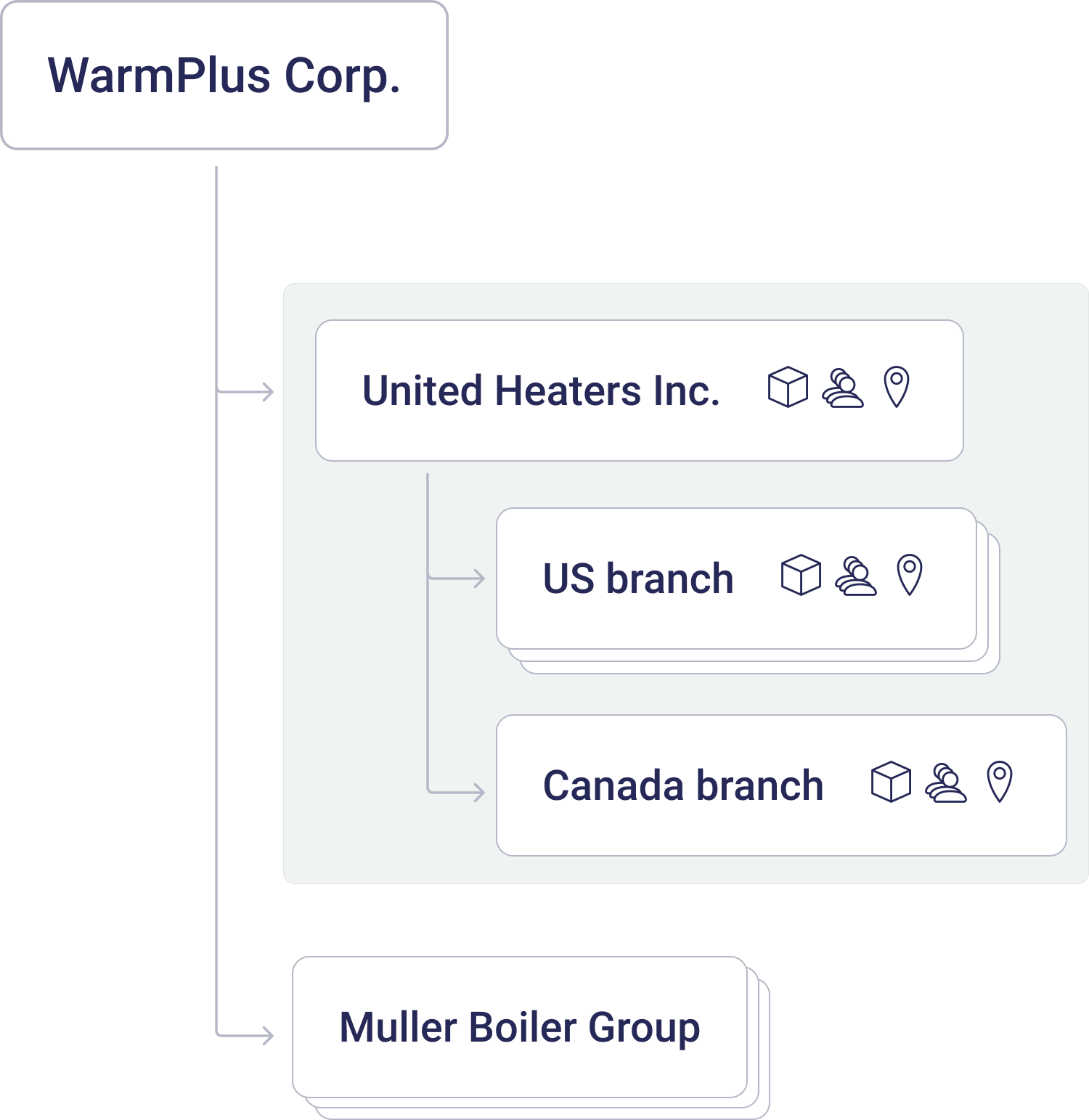 It's important to understand that any user that is above a tenant in a hierarchy will have access to child tenant’s devices as well. Such an approach allows complex hierarchies to be created. For example, United Heaters could have distributors and contractors underneath them who in turn can have their own customers.
You can assign users to any level in the hierarchy and they will have access to their own devices and any device beneath them.
---
# Agent Instructions
This documentation is published with GitBook. GitBook is the documentation platform designed so that both humans and AI agents can read, navigate, and reason over technical content effectively. Learn more at gitbook.com.
## Querying This Documentation
If you need additional information that is not directly available in this page, you can query the documentation dynamically by asking a question.
Perform an HTTP GET request on the current page URL with the `ask` query parameter, and the optional `goal` query parameter:
```
GET https://docs.blynk.io/en/concepts/users/multi-tenant-tree-structure.md?ask=&goal=
```
`ask` is the immediate question: it should be specific, self-contained, and written in natural language.
`goal` is optional and describes the broader end goal you are ultimately trying to accomplish on behalf of the user. GitBook uses it to tailor the answer towards what is most useful for that goal.
The response will contain a direct answer to the question and relevant excerpts and sources from the documentation.
Use this mechanism when the answer is not explicitly present in the current page, you need clarification or additional context, or you want to retrieve related documentation sections.
It's important to understand that any user that is above a tenant in a hierarchy will have access to child tenant’s devices as well. Such an approach allows complex hierarchies to be created. For example, United Heaters could have distributors and contractors underneath them who in turn can have their own customers.
You can assign users to any level in the hierarchy and they will have access to their own devices and any device beneath them.
---
# Agent Instructions
This documentation is published with GitBook. GitBook is the documentation platform designed so that both humans and AI agents can read, navigate, and reason over technical content effectively. Learn more at gitbook.com.
## Querying This Documentation
If you need additional information that is not directly available in this page, you can query the documentation dynamically by asking a question.
Perform an HTTP GET request on the current page URL with the `ask` query parameter, and the optional `goal` query parameter:
```
GET https://docs.blynk.io/en/concepts/users/multi-tenant-tree-structure.md?ask=&goal=
```
`ask` is the immediate question: it should be specific, self-contained, and written in natural language.
`goal` is optional and describes the broader end goal you are ultimately trying to accomplish on behalf of the user. GitBook uses it to tailor the answer towards what is most useful for that goal.
The response will contain a direct answer to the question and relevant excerpts and sources from the documentation.
Use this mechanism when the answer is not explicitly present in the current page, you need clarification or additional context, or you want to retrieve related documentation sections.